Posts

How to stay ahead with your home pc security

This article is about security and how to minimize your exposure to malware / virusses / trojans. Keep in mind that this article is written for the home user and not for the large companies with for example Checkpoint Firewalls with IPS blades, and with SCCM 2012 with integrated CSI, forefront etc.... This is about the average joe who wants to stay secure while browsing the World Wide (War) Web. The first thing to achieve the above goal, is to keep you off from malicious sites who deploy trojans, try to run botnets etc etc.... for this I use OpenDNS . Speed up your Internet experience OpenDNS’s 12 global data centers are strategically located at the most well-connected intersections of the Internet. Unlike other providers, OpenDNS’s network uses sophisticated Anycast routing technology, which means no matter where you are in the world, your DNS requests are answered by the datacenter closest to you. Combined with the largest DNS caches in the industry, OpenDNS provides yo...
RDP Authentication issues Windows 2008 R2

Today we had a nasty encounter with sudden access denied on RDP connection to our Terminal Server Farms. The day started that users could not connect to our Navision environment, this environment constists of an Terminal Server farm with an SQL 2008 Cluster. After analyzing first symptoms we saw that the SQL Cluster had failed over but that the quorum disk was stil on the Node that had "sudden" issues. Thus we gracefully brought the faulty node down through Cluster Manager and started it up again. In the meantime we were notified that there were still issues, then we saw profile redirection errors caused by a faulty location and permissions of the user profile location. We left the profiles at default location and focussed on the permissions we fixed them, and users started to report that they could log in again. But now problems started to appear out of now where users could not connect to our other Terminal Servers farms for other application, we where now m...

How to Upload to multiple stocksites at once for free with Adobe Lightroom [Part 1 of 2]

Ever since I've starting to upload my photo's to some microstock sites I always have been looking for the easiest and fastest way possible to upload them to the microstock sites I'm on. The reason I upload my photo's to multiple microstock sites lies in the fact that you only can make some money if you upload either a lot photo's or some photo's to a lot of microstock sites. Since I don't have a lot of photo's to upload to microstock sites I choose the latter, I upload to a lot of microstock sites. When you do the math it becomes obvious. Lets say I have 20 photo's that are good enough to upload to microstock sites and I upload them to 25 microstock sites I have effectively the same exposure as with 500 photo's But do it with 500 photo's and you reach a whopping 12500 photo's online. So in order to put in a year 12500 photo's online you only have to shoot 5 decent pictures in a weekend that you can upload to a microstock site. ...

[Solved] Avira keeps it quiete about the mess they made...

Solution below I was having some problem since yesterday that my DllHost.exe process was blocked by Avira. I suspected that I was infected with some kind of worm, which is odd since I run several layers of security to prevent this. Today I had enough and sought after a solution on the internet, I was dumbfounded to find this. Please Note its in German and it published 10:44 +1 GMT (DST) Sehr geehrter Avira Nutzer, nach dem Produktupdate der Avira Software werden diverse Anwendungen als gefaehrlich eingestuft und von der Komponente ProActiv blockiert. Unsere Entwicklung arbeitet derzeit mit Hochdruck an einem automatischen Update zur Beseitigung des Fehlers. Damit Sie Ihren Computer wieder wie gewohnt benutzen koennen haben wir 2 Loesungsvorschlaege die wir Ihnen im Moment anbieten koennen: Loesung A: ProActiv deaktivieren 1. oeffnen Sie das Avira Control Center 2. druecken Sie die Taste "F8" um die Konfiguration zu oeffnen 3. aktivieren Sie links oben den ...
Const ForReading = 1 Dim arrTapes() Redim arrTapes(1) strPrevTapeNumber = "xxxx" Dim objDictionary Set objDictionary = CreateObject("Scripting.Dictionary") 'Reading Arguments from the commandline Set args = WScript.Arguments argTapesExportFile = args.Item(0) argPoolName = args.Item(1) Set objFSO = CreateObject("Scripting.FileSystemObject") Set objTextFile = objFSO.OpenTextFile(argTapesExportFile, ForReading) Do While objTextFile.AtEndOfStream <> True   strLine = objtextFile.ReadLine   If inStr(strLine, argPoolName) Then     strTapeNumber = Mid(strLine,InStr(strLine,argPoolName) - 7,7)       if not inArray(arrTapes,strTapeNumber) then         redim preserve arrTapes(ubound(arrTapes)+1)         arrTapes(ubound(arrTapes)) = strTapeNumber         wscript.echo arrTapes(ubound(arrTapes))       end if    End If    strPrevTapeNumber...

Restore Exchange 2003 Database from Dirty Shutdown

Friday, normally a very quiet day, today was going to be different than I had anticipated. I got in the in office and overheard a collegue, talking with a sysadmin from a subdivision about an exchange server. Damn I knew it immediately it was the one from yesterday that wend down 30 times in 12 hours. They had replaced the systemboard, and where now knocking on our doors for help because the Mailbox database wouldn't mount, and before I even got a cup of coffee I was on the phone and started the rdp session to the server. Our exchange environment consists of about 135 exchange 2003 servers. But the one I now needed to rdp to I knew the hostname already. On the phone with the sysadmin I started the needed actions, and I've written them down so it maybe helps someone in the future. This article explains all the steps you need to take to be a bring a exchange 2003 mailbox store that is in a "Dirty" Shutdown state back to life. Actions performed for exchange 200...

How to save your work from a system drive with Bitlocker

This is real small tip but a very crucial one. When you have bitlocker on your systemdrive and somehow your windows installation becomes corrupt then this is the procedure on how to access your data still on the systemdrive. 1. Get the system drive physically out of your system. 2. Attach the drive to another system running windows. 3. When you want to access your data browse to the drive and access it like your reguraly do. 4. You will be prompted to type your PIN. You can see that this only will work when you know your PIN.

New Virus causes Havoc!

http://www.eset.eu/download/ezimuse-remover the reason I show you the below commands is that the remover executes these commands. However there is an Error it doesn't stop the Service MStart first therefor sc delete will fail. I hope this will help you sc stop UnzipService sc stop Mseu sc stop MStart sc delete UnzipService sc delete Mseu sc delete MStart ren C:\Windows\System32\Mseus.exe Mseus.exe.vir del /Q /F C:\Windows\System32\Drivers\Mseu.sys del /Q /F C:\Windows\System32\Drivers\Mstart.sys del /Q /F C:\Windows\System32\ainf.inf del /Q /F C:\Windows\System32\tokset.dll del /Q /F "C:\Program Files\Dump\Dump.exe"

script to export tapes from Eternus i500 Scalar Fujitsu

:::::::::::::::::::::::::::::::::::::::::::::::::::::::::::::::::::::::::::::::::::::::::::::::::::::::: :: :: Script om tapes te exporteren vanuit de robot naar de mailsloten :: :: Version History :: 2009/12/11 version 1 Teus :: 2010/01/11 version 2 Teus :: :: :::::::::::::::::::::::::::::::::::::::::::::::::::::::::::::::::::::::::::::::::::::::::::::::::::::::: @echo off :::::::::::::::::::::::::::::::::::::::::::::::::::::::::::::::::::::::::::::::::::::::::::::::::::::::: :: GENERAL HOUSEKEEPING :::::::::::::::::::::::::::::::::::::::::::::::::::::::::::::::::::::::::::::: :::::::::::::::::::::::::::::::::::::::::::::::::::::::::::::::::::::::::::::::::::::::::::::::::::::::: :: :: Set Script Paths :: ::::::::::::::::::: SET scriptpath=E:\centricstor SET outputpath=E:\centricstor\out SET cygwinpath=E:\cygwin\bin SET robotip=root@172.16.4.130 SET vmquery_path="e:\program files\veritas\volmgr\bin\vmquery" :::::::::::::::::...

CentricStor i500 Scalar [Tape handling]

This is script is created to easy the tapehandling of Quantum i500 scalar robot in combination with a centricstor. All you have to do now is to insert the tapes in IO, then on the screen hit library. tapes are now available for the library. We now need to assign the tapes in IO to the Library. And then to a Volume Group. 1. jukeadm /dev/fsc/CentricStor/c16t000073l1 l s this command lists all slots from the library. 2. jukeadm /dev/fsc/CentricStor/c16t000073l1 l i this command lists all IO slots 3. jukeadm /dev/fsc/CentricStor/c16t000073l1 m i s this command moves a tape from IO to a Slot in the library 4. plmcmd conf -I -V -G 'Script om tapes te importeren. 'De tapes worden vanuit IO sloten naar sloten in de robot geplaatst. Const ForReading = 1 Const ForWriting = 2 Const ForAppending = 8 Dim oShell Dim oShell2 Dim bIOSlotFound Dim inpPoolName iCounter = 0 inpPoolName = "XXXXXX" bPoolFound = False strEmptySlotsPath = "e:\centricstor\out\empty_slots.txt...

Delete files older than x days using batch script

This one keeps coming back when you are administering several systems which are all pushing out some files to storage for example OLD SQL servers who are spitting out BAK files. Forfiles /P D:\SQLbackup /S /M *.BAK /D -2 /C "cmd /c del /q @path" Forfiles is standard included in windows since Windows 2000 Let me explain the switches I used. /P |This one is for specifying the path. /S |This is the same as in the dir command for recursively enumerating the files. /M |Where you specify the search pattern to look for. /D -2 |This is the most interesting part beacause this switch looks for files older or equal than 2 days. /C |Here is where you specify what to do. If you want to start a command make sure it starts with cmd /c, I did a del command specifying the file by using the @path variable.

Starting a CMD prompt hidden for cacti poller.php

After implementing a CACTI monitoring environment at our customer on a windows platform (huh). We had a problem that our CACTI poller scheduled task was visible when it was started. I first created this vbscript. To start the commandprompt hidden. Set WshShell = WScript.CreateObject("WScript.Shell") Set WshExec = WshShell.Exec("php c:\Apache2\htdocs\cacti\poller.php") But this method is much better. Because it fits on 1 line! CreateObject("Wscript.shell").run "php c:\Apache2\htdocs\cacti\poller.php",0 In short to run the cacti poller hidden you only have to schedule the above line in a vbscript every 5 minutes.

Netbackup Admin Script

Normal procedure for NetBackup with our Robot with 2 LTO4 tapes is physically adding media then do an inventory and then check in the gui your retention period for the tapes. I've written a script which does all that. The only thing you need to change part where I let findstr search for eg LTO4 (all our LTO4 tapedrives use a pool with LTO4 in the name) @echo off e: cd "\Program Files\Veritas\Volmgr\bin" Rem ***************** REM * Inventory Robot REM ***************** vmupdate -rt TLD -rn 1 -h hpbck01 -rh hpbck01 -use_barcode_rules Rem ************** Rem * Expire Media REM ************** for /f "delims=, " %%a in ('"vmquery -rn 1 -bx findstr /I "LTO4""') do "E:\Program Files\Veritas\NetBackup\bin\admincmd\bpexpdate.exe" -d 0 -ev %%a -force Rem **************************** Rem * Move media to scratch pool REM **************************** for /f "delims=, " %%b in ('"vmquery -rn 1 -bx findstr /I "NetB...

Recover Deleted Items Outlook 2000

By default, the Recover Deleted Items functionality is only enabled on the Deleted Items folder in a user's private folders. Items that are hard deleted cannot be recovered. To enable the Recover Deleted Items functionality on mail folders other than the Deleted Items folder (for example, for the Sent Items, Drafts, Outbox and Inbox folders), make the following changes to the registry: Start Registry Editor. Locate and then click the following key in the registry: HKEY_LOCAL_MACHINE\SOFTWARE\Microsoft\Exchange\Client\Options On the Edit menu, click Add Value , and then add the following registry value: Value name: DumpsterAlwaysOn Data type: DWORD Value data: 1 Close Registry Editor. You can use an administrator's computer or a user's computer to make this change to the registry. After you change the registry, start Outlook, and then click Deleted Item Recovery on the Tools menu. A list of items that were hard deleted during the retention time that is set on the s...

Copy fonts using script for unattended vista install

I had to create a vbscript to copy fonts from a network share for an unattended vista (or windows 7) install Const FONTS = &H14& Set objShell = CreateObject("shell.Application") Set objFolder = objShell.Namespace(FONTS) strdir = "\\srv001\REMINST\Drivers\Finalize\Fonts" enumdir(strdir) Sub EnumDir(strdir) dim FSO,f,fc set FSO=Wscript.CreateObject("scripting.FileSystemObject") If fso.FolderExists(strDir) then set f=fso.GetFolder(strDir) set fc=f.files if fc.Count > 2 then for each fl in fc objFolder.CopyHere strdir & "\" & fl.name next End If else wscr...

Terminal Server Profile Path Woes

During a migration process I came accross this odd problem. I could not change a Terminal Server Profile Path for a couple of hundred users. I searched the microsoft site but I could not find anything that would help me quick. Yes I did find this link http://technet.microsoft.com/en-us/library/cc783578.aspx But my client did not have grouppolicies in place and I did not want to use the "Terminal Services Extension" I found several partly usefull scripts I combined the best of them in the script below. I really hope you will find this usefull. '****************************************************************************** Const ADS_SCOPE_SUBTREE = 2 Const ForAppending = 8 On Error Resume Next Set objFSO = CreateObject("Scripting.FileSystemObject") Set objTextFile = objFSO.OpenTextFile ("c:\myusers.txt", ForAppending, True) Set objConnection = CreateObject("ADODB.Connection") Set objCommand = CreateObject("ADODB.Command") objConnect...

Monitoring your windows servers with email alerts from the commandline

Image
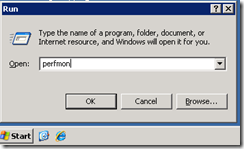
This is something that you will have to face allways. You must monitor all servers that are under your command this way ensuring that servers keep on running happily. For this I use the builtin perfmon and I use the opensource application SendEmail [you can download it here ] SendEmail is just an exe you don’t have to install it, just put in a folder lets say [ D:\SendEmail ] I use a complete seperate machine to monitor my network this way I keep the load off from monitoring and this ensures the most accurate data. In this example I want to monitor the free space on the c:\ drive of a remote server called “Fileserver” On the machine from which you want to monitor start perfmon just hit [ winkey + r and type perfmon ] this is the quickest way.   You will see this screen: In the left hand side expand performance logs and alerts. Right click alerts and choose [New Alert Settings]     give your alert a meaningfu...

How to delete the deleted Items folder in Exchange 2003

Image
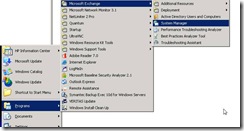
  I had a problem that users used the deleted Items as a filing cabinet. This is how we got rid of that J There are 2 ways accomplishing this task one is via GroupPolicy and one is through Exchange System Manager. In this article I’ll discuss the latter because I love to use the tools builtin in ESM. Go to ESM Then go to the folder recipients in ESM and hit the right mousebutton. And choose [Recipient Policy] The dialogbox New Policy appears check the checkbox [Mailbox Manager Settings] and hit [OK] Now give the Policy a meaningfull name And Hit the [Modify] button because I want this policy only to be applied to the office department in Amsterdam. I’ll show you how I can do that. In the find Exchange Recipients dialogbox go to the dropdownbox find and choose Custom Search. In the Custom Search Tab choose Contact and select Department. (I use in ADUC the organization tab and I fill the department field with Amsterdam for users in the OU Am...

Openoffice 3.0.0 is out

You can grab the release here: http://ftp.tu-chemnitz.de/pub/openoffice-extended/stable/3.0.0/   Or choose a mirror close to you. http://distribution.openoffice.org/mirrors/

Microsoft Hyper-V Server FREE

Image
Free Download Get Hyper-V Server 2008 here! Microsoft Hyper-V Server 2008 provides a simplified, reliable, and optimized virtualization solution, enabling improved server utilization and reduced costs. Since Hyper-V Server is a dedicated stand-alone product, which contains only the Windows Hypervisor, Windows Server driver model and virtualization components, it provides a small footprint and minimal overhead. It easily plugs into customers’ existing IT environments, leveraging their existing patching, provisioning, management, support tools, processes, and skills. Key Benefits Improved server utilization Small footprint Minimal overhead IT Pros can easily to leverage their existing knowledge and skills with Microsoft virtualization products, as well as the collective knowledge of the community, minimizing any learning curve. In addition, with Microsoft providing comprehensive sup...